

Why xorq? In 9 Examples
WHY XORQ? IN 9 EXAMPLES
By Xorq Team | March 16, 2026
What is a data pipeline?
A data pipeline is code that reads data, transforms it, and writes results somewhere. Every company that uses data has them. They look like this:
import pandas as pd

# Read
df = pd.read_csv("sales.csv")  # read in sales

# Transform
df = df[df["amount"] > 100] # filter to only sales that were greater than $100
df = df.groupby("region").agg(total=("amount", "sum")) # calculate sums for each region

# Write
df.to_parquet("regional_sales.parquet") # write the result a regional_sales file
Simple enough. But real pipelines aren’t simple. They span multiple databases, take hours to run, break in subtle ways, and accumulate glue code that nobody wants to touch. The gap between a 5-line example and a production pipeline is enormous.
xorq is a Python library that closes that gap. It gives you a composable expression language built on Ibis and Apache DataFusion that works across database engines, caches intelligently, and keeps pipelines portable.
This post walks through common data pipeline pain points and how xorq solves them.
Unnecessary recomputation
Most pipelines recompute everything on every run. Even if the data and logic haven’t changed, the entire pipeline executes from scratch. For a pipeline that takes 40 minutes, this is a daily tax on your infrastructure and your patience.
Some teams bolt on manual caching—checking timestamps, writing to intermediate tables with names like staging_v3_final_FINAL. This is fragile. Change the query slightly and your cache serves stale data. Forget to invalidate and you get wrong results silently.
import pandas as pd
from pathlib import Path

# Manual caching — fragile and error-prone
cache_path = Path("cache/aggregated_sales.parquet")
if cache_path.exists():
    df = pd.read_parquet(cache_path)
else:
    df = pd.read_csv("sales.csv")
    df = df.groupby("region").agg(total=("amount", "sum"))
    df.to_parquet(cache_path)
    # What if the query changes? This cache doesn't know.
    # What if sales.csv changes? Same problem.
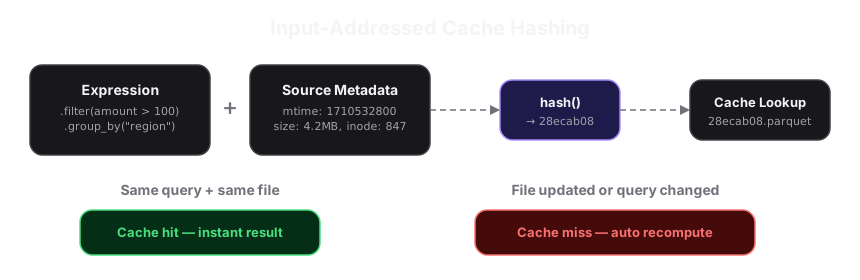
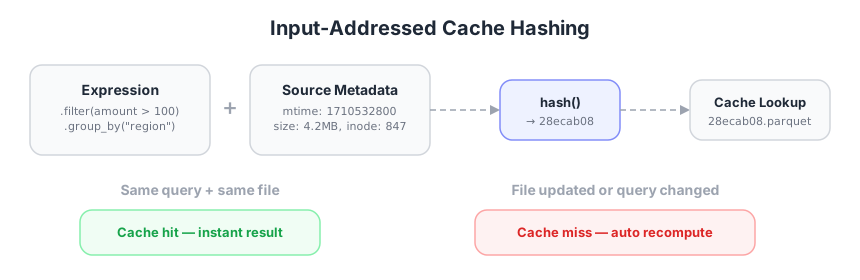
xorq caches by hashing the expression itself. The cache key is a deterministic hash of what you’re computing and what the source data looks like. Change the query? Different hash, automatic recompute. Same query, same data? Cache hit, instant result.
Crucially, the hash includes source file metadata—the file’s modification time, size, and inode. So if sales.parquet gets updated on disk, the hash changes automatically and xorq recomputes instead of serving stale results. No manual invalidation needed.
import xorq.api as xo
from xorq.caching import ParquetCache

cache = ParquetCache.from_kwargs(source=xo.connect())

expr = (
    xo.deferred_read_parquet("sales.parquet")
    .filter(xo._.amount > 100)
    .group_by("region")
    .agg(total=xo._.amount.sum())
    .cache(cache=cache)
)

result = expr.execute()  # First run: computes and caches
result = expr.execute()  # Second run: cache hit (same file, same query)

# Later, sales.parquet gets overwritten with new data...
# The file's mtime changes, so the hash changes.
result = expr.execute()  # Cache miss: automatically recomputes
No naming scheme. No expiration timers. The expression and its source metadata are the cache key.
Multi-engine glue code
Real pipelines touch multiple systems. Your user data lives in Postgres. Your analytics run in DuckDB. Your ML features come from Snowflake. Connecting these means glue code: extraction scripts, serialization logic, temp files, connection management.
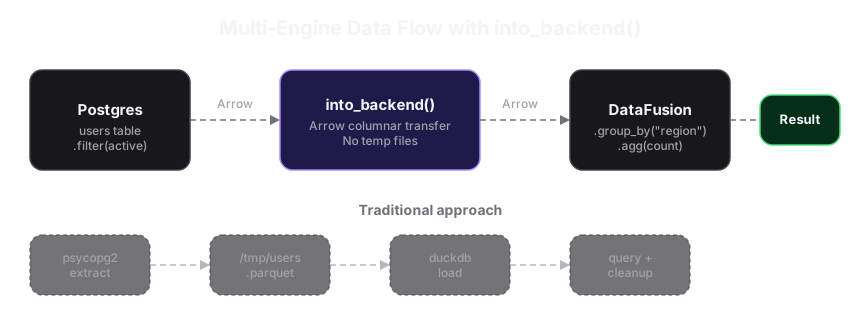
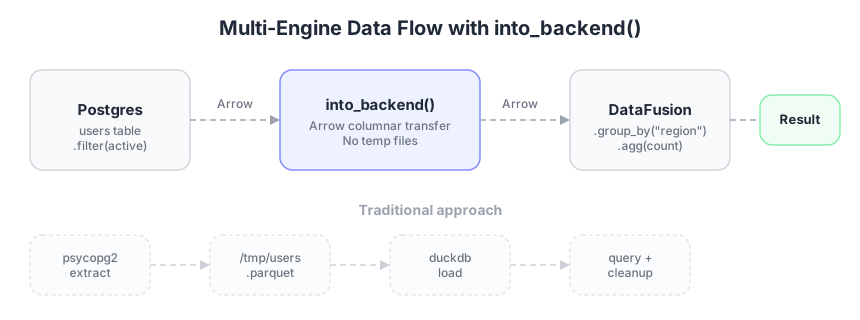
This glue code is easy to write—Claude will generate it for you in seconds. But it comes out different every time. One script writes to /tmp/users_extract.parquet, the next to /tmp/users_staging.parquet. One uses psycopg2, the next uses sqlalchemy. One handles connection cleanup, the next doesn’t. You end up with dozens of slightly different extraction scripts that all do the same thing.
import pandas as pd
import psycopg2
import duckdb

# Extract from Postgres
pg = psycopg2.connect("postgresql://localhost/prod")
users = pd.read_sql("SELECT * FROM users WHERE active", pg)
pg.close()

# Write to temp file because DuckDB can't talk to Postgres
users.to_parquet("/tmp/users_extract.parquet")

# Load into DuckDB for analytics
db = duckdb.connect()
db.execute("CREATE TABLE users AS SELECT * FROM '/tmp/users_extract.parquet'")
result = db.execute("SELECT region, COUNT(*) FROM users GROUP BY region").df()

# Clean up temp file, handle errors, manage connections...
xorq transfers data between engines with a single method call. Under the hood it uses Apache Arrow for efficient columnar transfer—no temp files, no serialization code.
import xorq.api as xo

pg = xo.postgres.connect_examples()
db = xo.connect()  # local DataFusion engine

expr = (
    pg.table("users")
    .filter(xo._.active == True)
    .into_backend(db)  # Arrow transfer from Postgres → local engine
    .group_by("region")
    .agg(count=xo._.id.count())
)

result = expr.execute()
You can chain into_backend() calls to move data through multiple engines in a single pipeline. Each engine runs the part of the query it’s good at. into_backend() replaces all of that glue code with one predictable operation.
Pipelines break when you change engines
Wrote your pipeline against Postgres? Moving to Snowflake means rewriting SQL dialects, changing connection logic, updating type mappings, and testing everything again. Your business logic—the actual transforms—is tangled up with engine-specific syntax.
# Postgres-specific SQL
pg_query = """
    SELECT region, SUM(amount) as total
    FROM sales
    WHERE amount > 100
    GROUP BY region
"""

# Same logic for Snowflake — different syntax, different driver
sf_query = """
    SELECT REGION, SUM(AMOUNT) as TOTAL
    FROM SALES
    WHERE AMOUNT > 100
    GROUP BY REGION
"""
# Two queries expressing the same thing.
xorq expressions compile to the target engine’s dialect automatically. Write once, run on any of the supported backends: DataFusion, DuckDB, Postgres, Snowflake, SQLite, Pandas, Trino, and others.
import xorq.api as xo

def sales_summary(table):
    return (
        table
        .filter(xo._.amount > 100)
        .group_by("region")
        .agg(total=xo._.amount.sum())
    )

# Same function, different backends
result_pg = sales_summary(xo.postgres.connect_env().table("sales")).execute()
result_dk = sales_summary(xo.duckdb.connect().table("sales")).execute()
result_sf = sales_summary(xo.snowflake.connect_env().table("sales")).execute()
The transform function doesn’t know or care which engine runs it. sales_summary accepts a table expression, not a DataFrame or a connection—it’s backend-agnostic by construction. The table parameter is an Ibis table expression, and operations like .filter(), .group_by(), and .agg() are defined on that expression type regardless of which engine produced it. xorq compiles these operations into the appropriate SQL dialect (or execution plan) at .execute() time, based on whichever backend the table is bound to.
ML training is tightly coupled to the pipeline
Training a model inside a data pipeline usually means pulling data out of the pipeline into pandas, training in sklearn, then somehow pushing predictions back in. The model training step is a black box—it’s not part of the expression graph, so you can’t cache it, version it, or compose it with other transforms.
import pandas as pd
from sklearn.model_selection import train_test_split
from sklearn.preprocessing import StandardScaler
from sklearn.neighbors import KNeighborsClassifier
from sklearn.pipeline import Pipeline

# Read data and split
df = pd.read_csv("iris.csv")
train, test = train_test_split(df, test_size=0.2)

features = ["sepal_length", "sepal_width", "petal_length", "petal_width"]

# Train (outside the pipeline, no caching, not composable)
pipe = Pipeline([("scaler", StandardScaler()), ("knn", KNeighborsClassifier(n_neighbors=11))])
pipe.fit(train[features], train["species"])

# Predict
test["prediction"] = pipe.predict(test[features])
# Now you need to glue this back into your pipeline somehow...
xorq wraps sklearn pipelines so that training and prediction are part of the expression graph. They’re lazy, cacheable, and composable like any other transform.
import xorq.api as xo
from xorq.expr.ml.pipeline_lib import Pipeline
from xorq.expr.ml import train_test_splits
from sklearn.pipeline import Pipeline as SKPipeline
from sklearn.preprocessing import StandardScaler
from sklearn.neighbors import KNeighborsClassifier

iris = xo.deferred_read_csv("iris.csv")
train, test = train_test_splits(iris, test_sizes=0.2, random_seed=42)

sk_pipe = SKPipeline([
    ("scaler", StandardScaler()),
    ("knn", KNeighborsClassifier(n_neighbors=11)),
])

pipe = Pipeline.from_instance(sk_pipe)
fitted = pipe.fit(train, features=("sepal_length", "sepal_width",
    "petal_length", "petal_width"), target="species")
predictions = test.pipe(fitted.predict).execute()
Pipeline.from_instance() takes a standard sklearn pipeline and wraps each step (scaling, classification) as a deferred expression node. When pipe.fit(train, ...) is called, nothing trains yet—it builds an expression that will train when executed. The test.pipe(fitted.predict) call adds a prediction node to the test expression. Only .execute() triggers the actual sklearn fit and predict, and the trained model is serialized and cached like any other intermediate result. If you run the same pipeline again with the same training data, it skips retraining.
Custom logic doesn’t travel between databases
Every real pipeline eventually needs custom logic—a scoring formula, a text normalizer, a rolling average your database doesn’t support natively. The typical escape hatch is to pull data out of the database into Python, run your function, then push results back. Or you write the function as a database UDF—but then it only works in that one database. Move to a new engine and you rewrite the function in that engine’s UDF syntax, or you’re back to the pull-to-Python workaround.
xorq provides a unified UDF system—scalar, aggregate, and window functions—that works across backends.
import xorq.api as xo
from xorq.expr.udf import pyarrow_udwf
import pyarrow as pa

@pyarrow_udwf(
    schema=xo.schema({"value": float}),
    return_type=xo.dtype(float),
    alpha=0.9,
)
def exp_smooth(self, values: list[pa.Array], num_rows: int) -> pa.Array:
    results, curr = [], 0.0
    for i in range(num_rows):
        v = values[0][i].as_py()
        curr = v if i == 0 else v * self.alpha + curr * (1 - self.alpha)
        results.append(curr)
    return pa.array(results)

expr = my_table.mutate(smoothed=exp_smooth.on_expr(my_table))
Write it once, use it in any pipeline regardless of backend.
Pipelines need to call external services
Data pipelines increasingly need to call things that aren’t databases—REST APIs, LLMs, ML inference services. The typical approach is to pull data out of the pipeline into Python, loop through rows calling the service, collect results into a DataFrame, and push it back in. This breaks the pipeline’s composability, doesn’t stream (you buffer everything in memory), and turns into bespoke glue code for every service.
import pandas as pd
from openai import OpenAI

df = pd.read_csv("posts.csv")
df = df[df["text"].str.contains("Python", na=False)]
df = df[["text"]].head(10)

# Call an external API row by row (slow, no streaming, not composable)
client = OpenAI()
df["sentiment"] = df["text"].map(lambda t: client.chat.completions.create(
    model="gpt-3.5-turbo", max_tokens=30,
    messages=[{"role": "user", "content": f"Sentiment of: {t}"}],
).choices[0].message.content)
# Now try composing this with a join or a group_by...
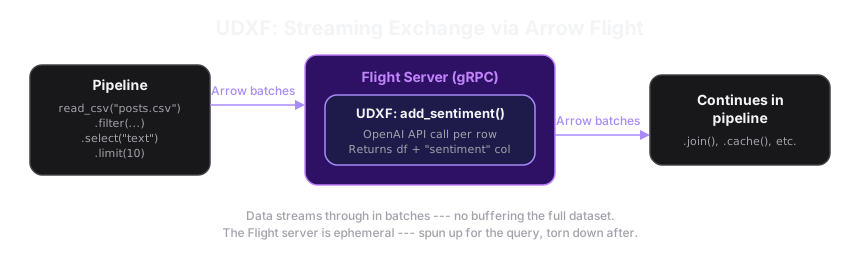
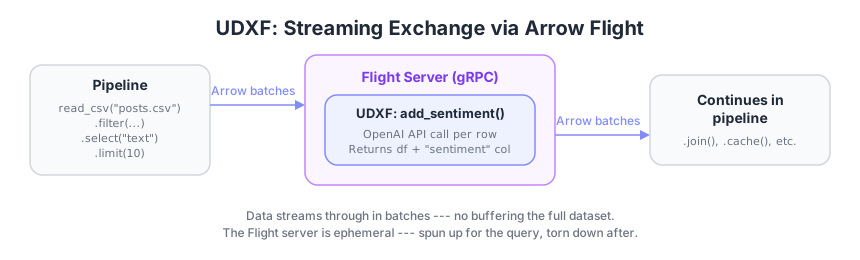
A UDXF (User-Defined Exchange Function) wraps arbitrary Python—API calls, LLM inference, complex transforms—as a composable pipeline step that streams data in and out via Apache Arrow Flight. You write a function that takes a pandas DataFrame batch and returns a pandas DataFrame batch. xorq handles the rest: it spins up an ephemeral gRPC server, streams data through your function in batches, and tears it down when done.
import pandas as pd
from openai import OpenAI
import xorq.api as xo
from xorq.flight.utils import schema_contains, schema_concat

def add_sentiment(df: pd.DataFrame) -> pd.DataFrame:
    client = OpenAI()
    df["sentiment"] = df["text"].map(lambda t: client.chat.completions.create(
        model="gpt-3.5-turbo", max_tokens=30,
        messages=[{"role": "user", "content": f"Sentiment: {t}"}],
    ).choices[0].message.content)
    return df

do_sentiment = xo.expr.relations.flight_udxf(
    process_df=add_sentiment,
    maybe_schema_in=schema_contains(xo.schema({"text": "!str"})),
    maybe_schema_out=schema_concat(to_concat=xo.schema({"sentiment": "!str"})),
    name="SentimentAnalyzer",
)

expr = (
    xo.deferred_read_csv("posts.csv")
    .filter(xo._.text.cast(str).like("%Python%"))
    .select("text")
    .limit(10)
    .pipe(do_sentiment)  # Streams through the LLM call, composable with everything else
)
result = expr.execute()
The key difference from regular UDFs: UDXFs run in a separate process with bidirectional streaming. Data flows through in batches—the pipeline doesn’t need to buffer the entire dataset before calling your function. This makes UDXFs suitable for I/O-heavy operations (API calls, network requests) that would block a database engine’s execution thread.
Pipelines are opaque and hard to reproduce
Someone asks “what exactly did this pipeline compute last Tuesday?” and you’re digging through git logs, environment variables, and Slack threads. There’s no single artifact that describes the full computation—inputs, transforms, parameters, dependencies—in a way that can be inspected or replayed.
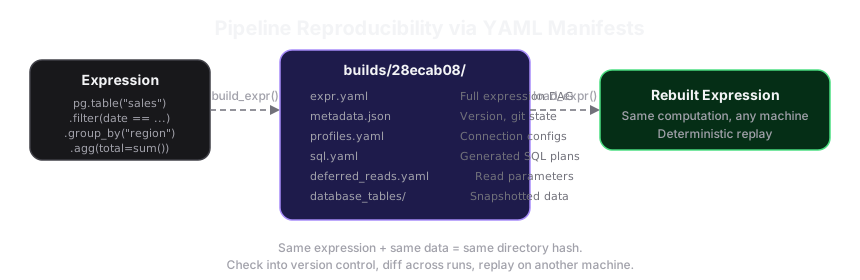
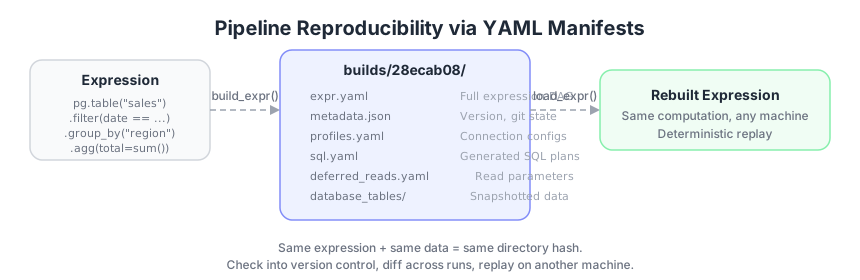
xorq can compile an entire expression graph—including deferred reads, cache references, connection profiles, and SQL plans—into a YAML manifest. This is a portable, versionable artifact that fully describes the computation.
builds/28ecab08754e/
  ├── expr.yaml           # Full expression DAG
  ├── metadata.json       # Build metadata
  ├── profiles.yaml       # Connection configs
  ├── sql.yaml            # Generated SQL plans
  ├── deferred_reads.yaml # Read parameters
  └── database_tables/    # Materialized data
      └── *.parquet
The directory name (28ecab08754e) is a hash of the expression. Same computation, same directory. Different computation, different directory.
A manifest alone doesn’t answer “what did this pipeline do last Tuesday?”—you also need the inputs. xorq handles this in two ways depending on where the data lives:
Local and in-memory data is snapshotted. When building a manifest, xorq writes any in-memory tables and local database tables as parquet files into the database_tables/ directory. These are part of the build artifact. You can load the manifest later and it will read from those snapshotted parquets, not from the original source.
Remote database tables are not snapshotted. If your pipeline reads from Postgres, the manifest stores the connection profile and expression, but not a copy of the data. Re-executing the manifest will query Postgres again with the current data.
To get full reproducibility with remote sources, cache the result of the remote read:
from xorq.ibis_yaml.compiler import build_expr, load_expr

# Build: snapshot the pipeline and its cached inputs
expr = (
    pg.table("sales")
    .filter(xo._.date == "2025-03-04")
    .cache(ParquetCache.from_kwargs(source=con))  # Caches the Postgres result locally
    .group_by("region")
    .agg(total=xo._.amount.sum())
)
build_dir = build_expr(expr)  # Writes manifest + snapshotted data

# Later: load and re-execute with the same inputs
rebuilt_expr = load_expr(build_dir)
result = rebuilt_expr.execute()  # Uses cached Postgres data, not a live query
The metadata.json records library version, Python version, and git state, so you can trace when and from what code a build was created. You can check build directories into version control, diff them across runs, or replay them on another machine.
Eager execution wastes resources
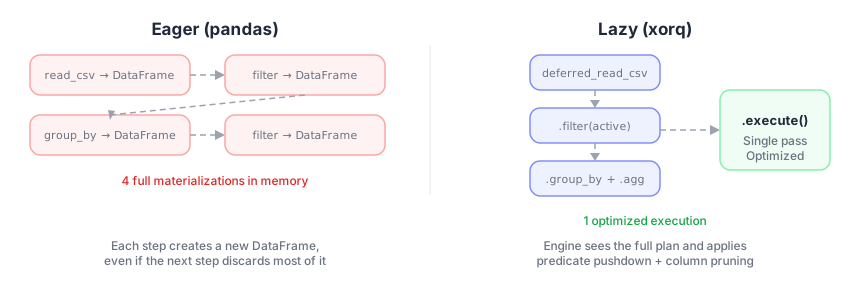
Traditional pandas code needs to immediately return results because of the way the library is designed. Each line produces a full DataFrame in memory, even if the next line throws most of it away. This makes it impossible for the engine to optimize across steps—it can’t know that a filter is coming, so it reads every column and every row upfront.
df = pd.read_csv("big_file.csv")          # Reads entire file into memory NOW
df = df[df["status"] == "active"]         # Creates new DataFrame NOW
df = df.groupby("region").sum()           # Creates another DataFrame NOW
df = df[df["total"] > 1000]               # And another one NOW
# Four materializations, only needed one.
xorq is lazy—nothing runs until you call .execute(). This means the computation engine sees the full plan before executing anything, and can optimize across multiple operations using predicate pushdown (apply filters early), column pruning (skip columns you never use), and operation fusing (combine adjacent steps).
import xorq.api as xo

expr = (
    xo.deferred_read_csv("big_file.csv")
    .filter(xo._.status == "active")
    .group_by("region")
    .agg(total=xo._.amount.sum())
    .filter(xo._.total > 1000)
)
# Nothing has executed yet. The engine sees the full plan.

result = expr.execute()  # Single optimized execution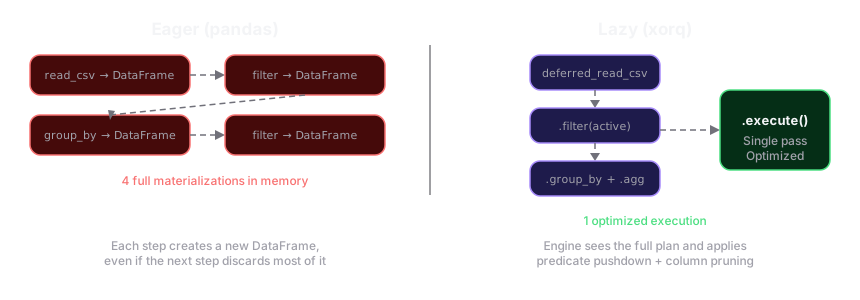
Conclusion
Data pipelines shouldn’t require a different caching strategy per engine, a new extraction script for every data transfer, or a rewrite every time you switch backends. xorq gives you a single composable layer—built on Ibis and Apache DataFusion—that handles caching, multi-engine orchestration, portable UDFs, and reproducible builds so you can focus on the transforms that matter.
If you’re tired of glue code and manual cache invalidation, give xorq a try.